Happy World Cardmaking Day! Hope that you are able to spend a moment today to make a card and send it to someone special – "just because". That's the beauty of cardmaking, I think – it's a craft that is based on sharing with others.
Here's a video I created (look at the fancy title and end bits!) to show you how to make a card using a technique that some call "Triple Time". If you saw my clip on CH Morning Live yesterday, it was the card at the top of the card tree. If you didn't see that clip, I'll include a link of it below as well. I had a great time as always on the show, and Annette Hamm is a crafter for sure! Despite my "epic time fail" I think it went pretty well. My epic fail was that I hauled my Big Shot along to show some fancy embossing and die cutting…..and we totally ran out of time before I even got to use it on air!!! Ah well, that means I have something to show next time, and I will be SURE to do that FIRST!!!
Without further ado – here's the video – enjoy, and if you make something with this, I'd love to see the results! Email me or post it to my page on facebook – www.facebook.com/yamstamps
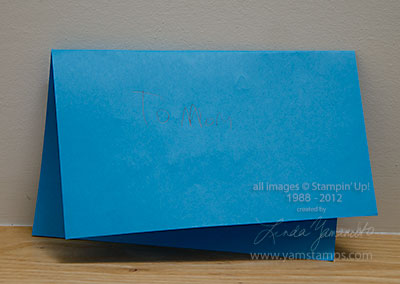
Thought I'd add a "Tuesday Tip" – a quick tip for your paper crafting! The plan is for this to be a semi-regular feature here at www.yamstamps.com Today's video tutorial is a variety of ways (okay, 4 to be exact) that you can create notched ends in your paper or ribbon to complete the look of your paper craft projects. If you are reading this in a reader or via email, the video may not appear, so in that case, please go to the video on the yamstamps youtube channel or the yamstamps blog to see it.
The stamp sets used in the project were Blue Ribbon and Confetti for the birthday card, and the swap card used Bootiful Occasions (on my wish list…LOL).
If you have anything you'd like to see featured on Tuesday Tips, please leave a comment below (please note, they will not appear right away as comments must be approved as legitimate!) or send me an email.
WOOHOO! Stampin’ Up! just announced to demonstrators that the 31% off Digital Sale is being extended to September 14th! Realizing that this is a bit of a crazy time of year for everyone, this gives you a bit more time to take advantage of the digital deals. These downloads work in My Digital Studio – Stampin’ Up!’s digital crafting program – aka MDS, MDS2 which was just released, and any program that can manage .png files (most of the photo editing software out there). I am just getting into MDS2 and working on some tutorial videos for you all.
Or…you can check out this video that I did a while back for MDS – using a template that’s now available in MDS2+. This is how easy it is to create something using the great digital templates available!! Drag and drop 🙂 (if you are reading this in a reader or email, the embedded video may not appear – come to www.yamstamps.com to check it out!)
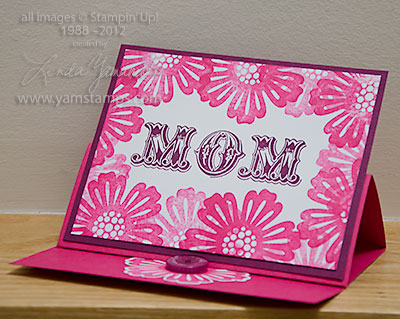
Here's a view of the prototype for the easel card that Annette & I made together on CH Morning Live (see the video here if you missed it). Easel cards are so much fun and not that difficult!
Quick instructions: I used a "regular" card size cardstock (8.5" x 5.5"), folded in half, then simply folded the front of the card in half again. You create your main image or use a photo, apply adhesive to the BOTTOM portion only, and adhere it to the bottom folded portion of the card front. (If you were watching closely enough on the video, I actually messed this portion up because I was trying to do this so quickly!). Then, add a little stopper to the inside/bottom of the card to hold everything in place. In this card, I used a punched out flower with a button. On the photo card I showed on Morning Live, I used a punched out sentiment that I adhered with Stampin' Dimensionals.
I hope that all the mothers out there have a happy Mother's Day! I know that I am so grateful to have such a supportive mother, and am lucky to be able to celebrate with my grandmother as well.
On facebook, I loved how many mothers were posting images of handmade cards that they'd received from their children. Here's mine :) (well at least the outside of it) – custom made for me in my favourite colour. Don't ever doubt the power of a hand crafted item!!
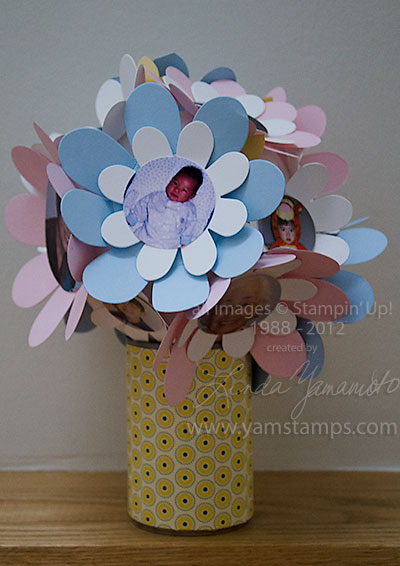
Just to hit the highlights for you, in case you'd like to create one for your mom this weekend!
You will need:
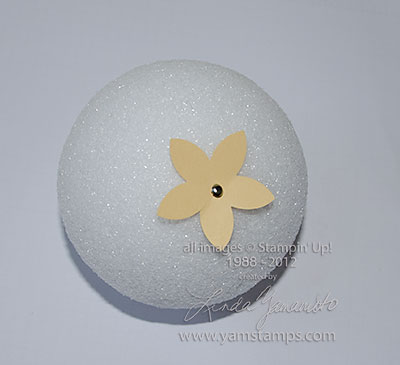
a styrofoam ball or floral foam ball available at craft stores
brads – I used Stampin' Up! silver mini brads plus you can use the clear rhinestone brads for the larger flowers. These will anchor the flowers in place plus will be safe for little hands to use (and occasionally clumsy larger hands which is where I fit in LOL)
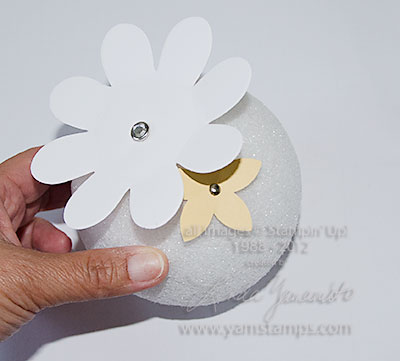
2) Start with the smaller flowers (learn by my mistakes – when I made mine, I was so keen to do the photo flowers I did them first, then had to manouever to get the smaller ones in place to cover the ball). Randomly place onto the styrofoam ball, using brads to pierce the centre of the flower & into the ball
3) Add larger flowers – you may wish to put some adhesive on the back of the flowers and then pierce them with a longer brad and into the styrofoam ball
4) Punch your photos using a circle punch
5) Adhere your photos to the centre of a flower on the ball, covering the brad OR stamp sentiments, use circle punch to punch out and then adhere to centre of flower. I sometimes matted a photo onto a smaller flower and then onto the flower on the ball.
6) Wrap your container with Designer Series Paper and adhere in place – set ball on top and you are done!
It's a really easy and fun project. Please feel free to leave a comment below (please note I've had to moderate all comments – too much spam coming through – so it may take a while to see your comment) or email me. If you create one, I'd love to see how yours turns out!!
So this extra day has got me all confused….one extra day this month/year and I'm messed up! Anyway – you'll see a familiar post tomorrow if you stopped by earlier today…
Happy Leap Day to all of you – have you "leapt" into digital crafting yet? (I know, right now you are marvelling at my language skills)… Just a reminder that Stampin' Up! offers a 30 Day free trial of My Digital Studio Express – and to help my customers get started, I will send you a link to sign up for a series of free video tutorials on this fun program. All you have to do is "purchase" the free trial HERE and once I get notification of your download, I'll send you the signup email for the tutorial program! As always, if you have any questions about this or any other Stampin' Up! product, feel free to contact me.